

Project Title:
ActiveBooks
Read. Learn. Play.
Project Type:
Master’s Program w/(mobile app Together App)
Project Date:
Dec 2020 – Jul 2021
My Role:
Project Lead,
UX Research, UI Design
Team Members:
Team: 2 UX classmates, Together App CEO
Tools:
AdobeXD, Miro, Zoom, Optimal
Workshop, Lookback.io, Userbrain,
Illustrator, Photoshop
Project Overview
Interactive books designed to enhance video calls between grandparents and grandchildren (ages 3–6), fostering conversation, learning, and engagement.
The Challenge
The idea for ActiveBooks stemmed from a clear need: to enhance the bonding experience between grandparents and their grandchildren aged 3-6 years during video chats.
Our research highlighted a gap in activities that could facilitate meaningful interactions across the digital divide. Grandparents often needed a conversational guide to help them engage with their grandchildren effectively.
The Solution
Our solution was to introduce ActiveBooks – a series of interactive books designed to be a facilitator during video chats. These books included a variety of activities such as reading, learning games, and playful interactions.
The content was crafted to serve as a conversational guide, ensuring that grandparents could easily navigate through activities and engage their grandchildren in a meaningful way.
Process

- Empathize and Research: We delved into understanding user needs through surveys, interviews, cultural probes, and usability tests, focusing on industry trends, child development, and competitor analysis.
- Define: Synthesizing our findings, we crafted a “How Might We” statement to focus our ideation on enhancing the grandparent-grandchild bond.
- Ideate: Our ideation process involved brainstorming sessions, exploring potential solutions, and refining our concept based on the HMW statement.
- Prototype: We developed the information architecture, user flows, and screen wireframes, leading to the creation of a lo-fi prototype.
- Test and Refine: The prototype underwent rigorous user testing, with feedback informing iterative design improvements.
Lo-fi Prototype Testing
These wireframes represent an evolution from concept to a more tangible representation of the app. They provided a blueprint for the interactive elements within the books, laying out the foundation for user interactions such as touch, drag, and voice commands.

Usability Test
In these usability tests, we wanted to pinpoint some of the issues that users mentioned in the Survey for current users that we conducted.
Recommendations
-
- Some issues can be fixed by revamping some UI elements.
- Conduct a heuristics review across various systems and devices to discover more possible pain points that users could be encountering.
Test Plan

My Role
My role was to write and organize the testing plan and script for both the Moderated and Unmoderated sessions.
Findings

Mid-fi Prototype Testing and Feedback
These screens illustrate significant improvements made based on user feedback from our testing sessions. Changes such as making the call button more prominent and simplifying the puzzle activity are highlighted here, showcasing the iterative process of testing and refining to meet our users’ needs.
Mid-fi Feedback
Opportunities for improvement
-
- Natural movement users performed was Drag and drop. Not clicking or tapping.
- Call button should be more prominent.
- Puzzle activity proved very confusing for users.
Positive Feedback
-
- Users understand the purpose of the application.
- Users find it simple and easy to understand.
- Users like the idea of interactive books: “It is bringing books to life for kids!”

Mid-fi Screen Updates
-
- We made the instructions in each activity clear by adding the word “CLICK.” This will let the user know that they have to click to perform an action.
- Made the call button more prominent.
- Made a new puzzle with a more easily identifiable image.

My Role
I prepared the moderated and unmoderated scripts for the user testing sessions. Then synthesized the feedback to report to our stakeholders.
For the User Interface, I updated the screens and created new elements based on the feedback from our user testing sessions. Such as rewriting parts of a story to make the instructions clear and redesigning an activity.
UI Screen Considerations and Accessibility Features
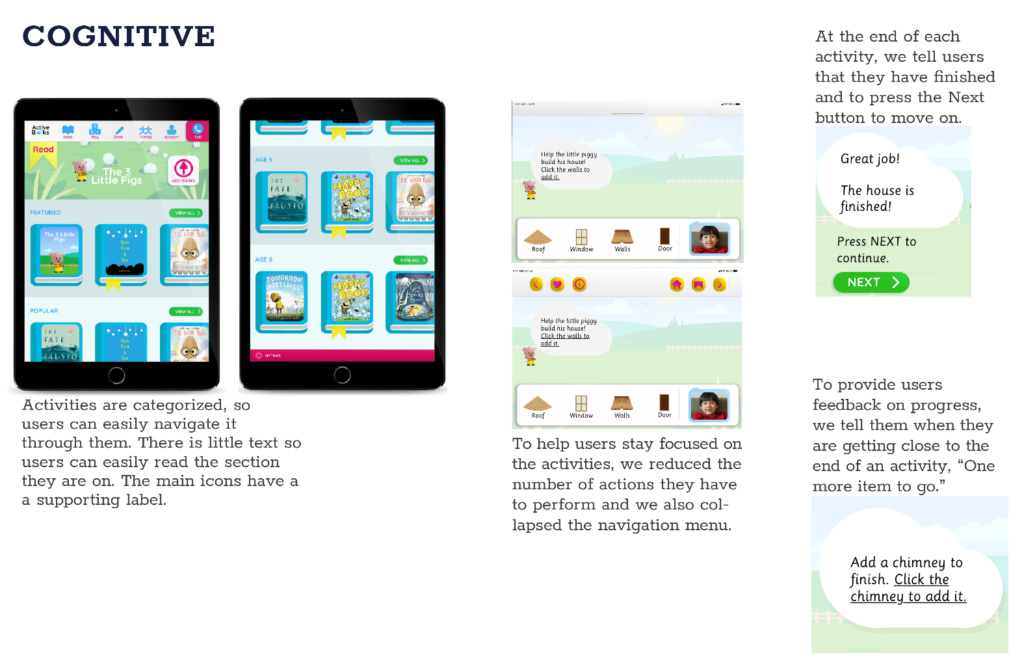
A snapshot of the design considerations implemented to make ActiveBooks inclusive and accessible. This includes the strategic layout of elements to minimize cognitive overload and the incorporation of features to support users with different needs.
Familiarity

To help users locate items on the screen, we will place them in areas they are familiar with, such as the header at the top and the footer at the bottom.
Reducing Cognitive Load
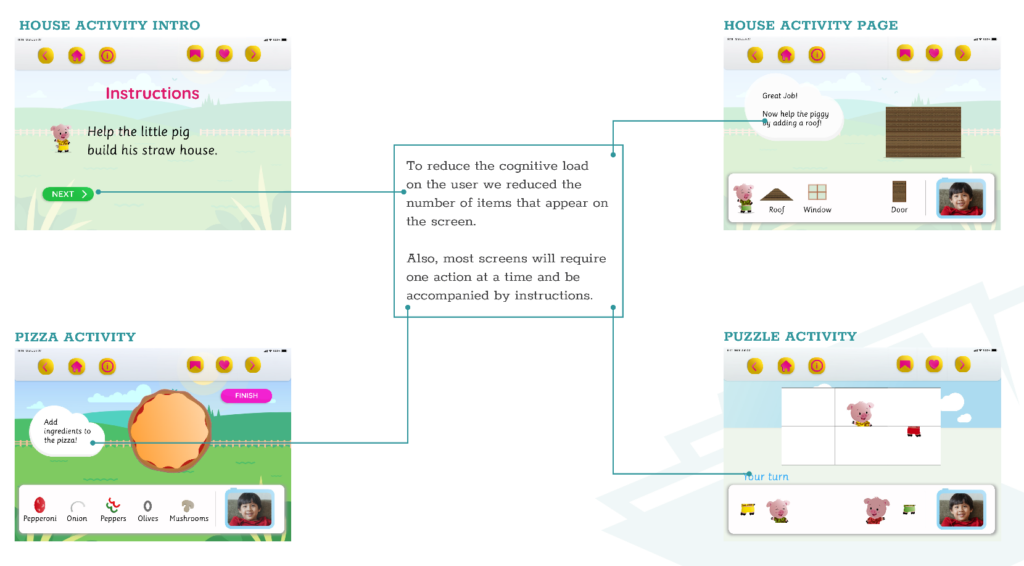
To reduce the cognitive load for the user, we minimized the number of items on each screen, and most screens will require one action at a time and will have instructions.
Consistency
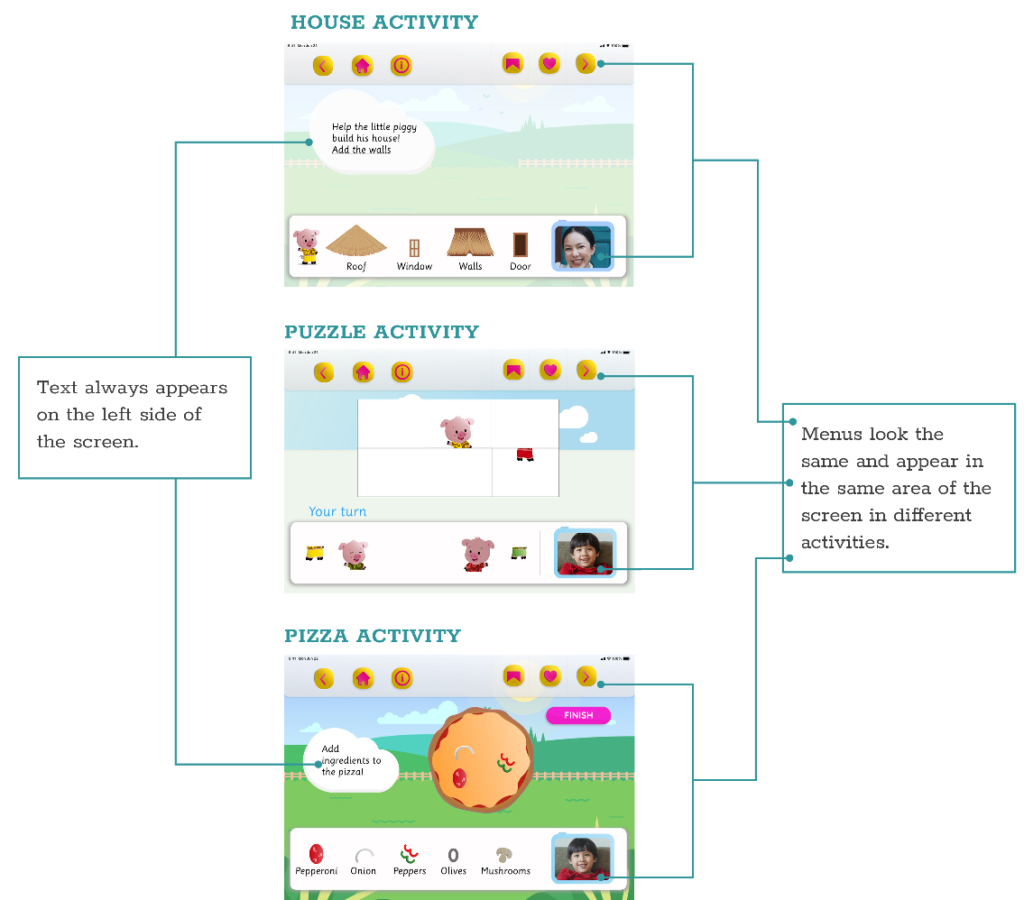
In each activity within the books, we made the layout consistent. Which will help the user forms habits that become almost second nature. To achieve this, we made the main elements uniform. They look, behave, and are in the same areas across different screens.
Accessibility strategies
Accessibility strategies deployed to support users:
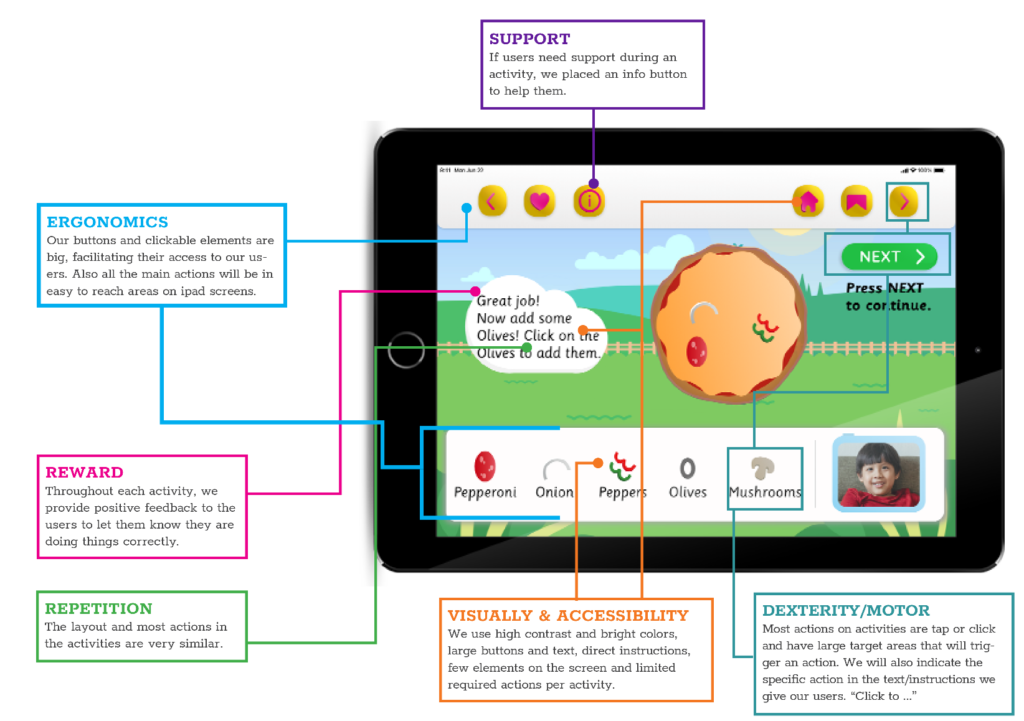
In our project ActiveBooks, we considered our two primary users, children ages 3-6 and grandparents, and applied some inclusivity and accessibility strategies to support them.
UI Elements
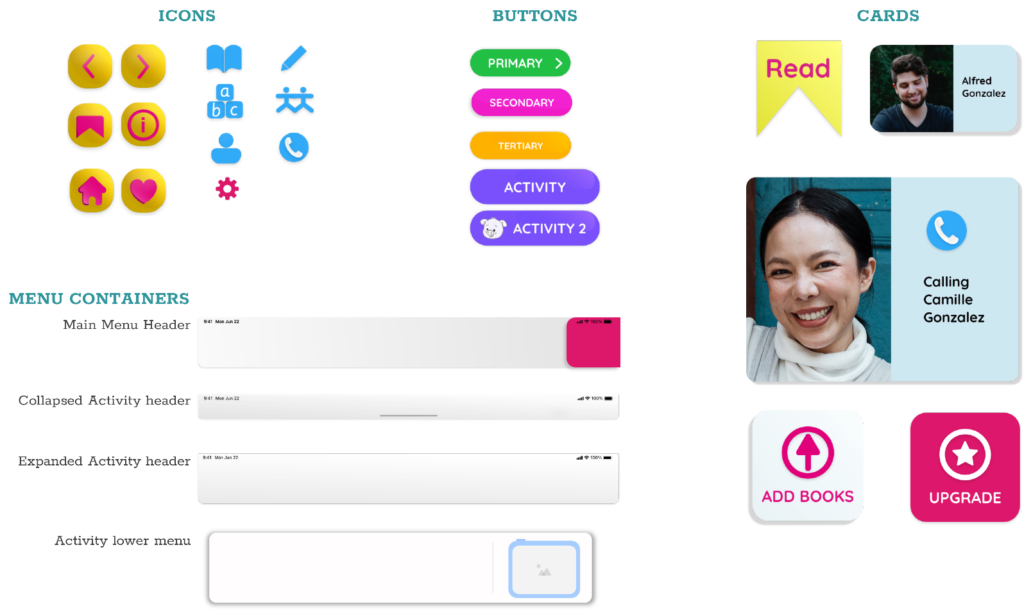
Showcasing the icons, buttons, and menus I designed, these visuals highlight the attention to detail in creating a user-friendly interface. Each element was crafted with the aim of reducing cognitive load, ensuring consistency, and enhancing the overall user experience.
Key Learnings
-
User-centered guidance enhances experience.
-
Iterative testing uncovers usability issues early.
-
Multi-generational design requires simplicity and engagement balance.
Outcomes
- Delivered a high-fidelity prototype in Adobe XD, showcasing interactive books with intuitive flows and engaging activities.
- Positive feedback from grandparents and parents on concept and usability.
- Demonstrated full UX design process from research to prototype.
- Highlighted how thoughtful design can bridge generational gaps.
Next Steps
In the end, we learned that grandparents needed a way to keep kids engaged in a video chat. Through testing our prototypes we saw that parents and grandparents like the concept of our interactive book. However, we would have to test it with children to see if they would like the concept.
Before that, we would also perform a heuristics review on the current app to uncover any other roadblocks the user could be facing, and recommend additional updates.
We would also see if the increase in the children’s publishing industry could present partnership opportunities.